Note
Click here to download the full example code
Lists of Neurons#
Work with many neurons at once using NeuronLists: indexing, filtering and batch operations.
Note
If you haven't please check out the neuron types tutorial first.
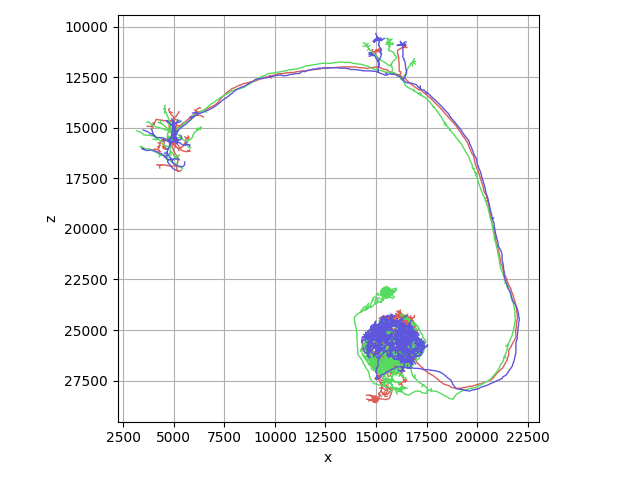
NAVis will typically collect multiple neurons into a navis.NeuronList as container. This container behaves like a mix of lists, numpy arrays and pandas dataframes, and allows you to quickly sort, filter and manipulate neurons.
Overview#
import navis

# Grab three example skeletons (TreeNeurons) as a NeuronList
nl = navis.example_neurons(n=3)
nl
Note
Note how just printing nl at the end of the cell will produce a nice summary table? If you want to get this table as pandas DataFrame, use the summary() method:
df = nl.summary()
import matplotlib.pyplot as plt

navis.plot2d(nl, view=('x', '-z'), method='2d')
plt.tight_layout()
Creating NeuronLists#
To create a NeuronList from scratch simply pass a list of neurons to the constructor:
n = navis.example_neurons(n=1)
nl = navis.NeuronList([n, n, n])  # a list with 3x the same neuron
nl
Accessing Neuron Attributes#
NeuronLists give you quick and easy access to data and across all neurons:
# Get the number of nodes in the first skeleton
nl = navis.example_neurons(n=3)
nl[0].n_nodes
Out:
4465
Use the NeuronList to collect number of nodes across all neurons:
nl.n_nodes
Out:
array([4465, 4847, 4332])
This works on any neuron attribute:
nl.cable_length
Out:
array([266476.88, 304332.66, 274703.38], dtype=float32)
Note
The n_{attribute} pattern works with any "countable" neuron attributes like nodes, connectors, etc.
If the neuron attribute is a dataframe, the NeuronList will concatenate them and add a new column with the neuron ID:
nl.nodes # note the `neuron` column
NeuronLists can also contain a mix of different neuron types:
nl_mix = navis.example_neurons(n=2, kind='mix')
nl_mix
Note how nl_mix contains a TreeNeuron and a MeshNeuron?
In such cases you have to be a bit more careful about asking for attributes that are not shared across all neurons:
Missing attributes
# MeshNeurons have no `cable_length` - so this raises an error:
nl_mix.cable_length
# Instead use the `get_neuron_attributes()` method with a default value:
nl_mix.get_neuron_attributes('cable_length', None)
Out:
array([np.float32(266476.88), None], dtype=object)
Indexing NeuronLists#
A NeuronList indexes like a cross between a Python list, a numpy array and a pandas DataFrame. The tabs below cover the main styles - each returns a new NeuronList:
Integers, lists of integers and slices - just like numpy:
nl[0]         # a single neuron
nl[[0, 2]]    # first and third neuron
nl[:2]        # first two neurons
Index with a boolean array - which includes any neuron attribute (n_nodes, cable_length, soma, ...):
nl[nl.n_branches > 700]   # neurons with many branches
nl[nl.soma != None]       # neurons that have a soma
Match against the neurons' .name. Pass a single name, several names or - since NAVis matches with re.fullmatch - a regex pattern:
nl["DA1_lPN_R1"]                   # single name
nl[["DA1_lPN_R1", "DA1_lPN_R2"]]   # multiple names
nl[".*DA1.*"]                       # regex
Every neuron has an .id (a random UUID if you didn't set one). Use the .idx indexer to select by ID, much like pandas' .loc[]:
nl.idx[1734350908]
Let's see one in action. First, give our three neurons unique names:
nl = navis.example_neurons(n=3)
for i, n in enumerate(nl):
    n.name = n.name + str(i + 1)
nl
Now subset to the neurons whose name matches the "DA1" pattern:
nl[".*DA1.*"]
Neuron Math#
NAVis implements an intuitive syntax for combining and subsetting NeuronLists. If you know how Python's list and set operators behave, these will feel right at home:
| Operator | On a NeuronList | Familiar from |
|---|---|---|
A + B | concatenate (also combines two neurons) | list + list |
A - B | remove the neurons in B from A | list.pop() |
A & B | keep only neurons present in both | set & set |
A | B | union of both lists | set | set |
A * x, A / x | scale coordinates by x | — |
The first four operators change which neurons are in the list:
Concatenate two lists - or combine two single neurons into a list:
nl[:2] + nl[2:]     # -> a list of 3 neurons
nl[0] + nl[1]       # two single neurons -> a NeuronList
Drop neurons from the list:
nl - nl[2] # remove the third neuron
Intersection - keep only neurons present in both lists:
nl[[0, 1]] & nl[[1, 2]] # -> just neuron 1
Union of both lists:
nl[[0, 1]] | nl[[1, 2]] # -> neurons 0, 1 and 2
Order is not preserved
Bitwise & and | will likely reorder the neurons in the resulting list.
Multiplication & division: scaling coordinates#
Multiplication and division are the odd ones out. Rather than changing which neurons are in the list, they scale the coordinates of every neuron in it - nodes, vertices, connectors and radii alike:
nl.units # our neurons are originally in 8x8x8 nm voxels
nl_um = nl * 8 / 1000  # convert neurons: voxels -> nm -> um
nl_um.units
The above will have changed the coordinates for all neurons in the list.
Comparing NeuronLists#
navis.NeuronList implements some of the basic arithmetic and comparison operators that you might know from standard lists or numpy.arrays. Most of this should be fairly intuitive (I hope) but there are a few things you should be aware of. The following examples will illustrate that.
In Python the == operator compares two elements:
1 == 1
Out:
True
2 == 1
Out:
False
For navis.TreeNeuron this comparison is done by looking at the neurons' attributes: morphologies (soma & root nodes, cable length, etc) and meta data (name).
nl[0] == nl[0]
Out:
True
nl[0] == nl[1]
Out:
False
To find out which attributes are compared, check out:
navis.TreeNeuron.EQ_ATTRIBUTES
Out:
['n_nodes', 'n_connectors', 'soma', 'root', 'n_branches', 'n_leafs', 'cable_length', 'name']
Edit this list to establish your own criteria for equality.
For NeuronList, we do the same comparison pairwise between the neurons in both lists:
nl == nl
Out:
True
nl == nl[:2]
Out:
False
Because the comparison is done pairwise and in order, shuffling a NeuronList will result in a failed comparison:
nl == nl[[2, 1, 0]]
Out:
False
Comparisons are safe against copying but making any changes to the neurons will cause inequality:
nl[0] == nl[0].copy()
Out:
True
nl[0] == nl[0].downsample(2, inplace=False)
Out:
False
You can also ask if a neuron is in a given NeuronList:
nl[0] in nl
Out:
True
nl[0] in nl[1:]
Out:
False
Operating on NeuronLists#
With very few exceptions, all NAVis functions that work on individual neurons also work on navis.NeuronList.
Note
In general, NAVis functions expect multiple neurons to be passed as a NeuronList - not as a list of neurons:
n1, n2 = navis.example_neurons(2)  # grab two individual neurons

# This will raise an error
navis.downsample_neuron([n1, n2], 2)

# This will work
navis.downsample_neuron(navis.NeuronList([n1, n2]), 2)
NeuronList methods#
Similar to individual neurons, navis.NeuronLists have a number of methods that allow you to manipulate the neurons in the list. In fact, (almost) all shorthand methods on individual neurons also work on neuron lists:
nl = navis.example_neurons(2)
for n in nl:
   n.reroot(n.soma, inplace=True)  # reroot the neuron to its soma
nl = navis.example_neurons(2)
nl.reroot(nl.soma, inplace=True)  # reroot the neuron to its soma
In addition navis.NeuronLists have a number of specialised methods:
nl = navis.example_neurons(3)  # load a neuron list
df = nl.summary()  # get a summary table with all neurons
df.head()
# Quickly map new attributes onto the neurons
nl.set_neuron_attributes(['Huey', 'Dewey', 'Louie'], name='name')
nl.set_neuron_attributes(['Nephew1', 'Nephew2', 'Nephew3'], name='id')
nl
# Sort the neurons by their name
nl.sort_values('name')  # this is always done inplace
nl
Of course there are also a number of NeuronList-specific properties:
is_mixed: returnsTrueif list contains more than one neuron typeis_degenerated: returnsTrueif list contains neurons with non-unique IDstypes: tuple with all types of neurons in the listshape: size of neuronlist(N, )
All attributes and methods are accessible through auto-completion.
What next?#
-
Neuron I/O ---
Learn about how to load your own neurons into NAVis.
-
Visualizations ---
Check out the guides on visualizations.
Total running time of the script: ( 0 minutes 0.469 seconds)
Download Python source code: tutorial_basic_02_neuronlists.py
Download Jupyter notebook: tutorial_basic_02_neuronlists.ipynb