Note
Click here to download the full example code
Depth-coloring#
Add a sense of depth by coloring neurons along the viewing axis.
The obvious issue with 2d plots is that they are... well, 2d, so they can't easily convey depth. What we can do is color the neuron by depth - i.e. by distance to the camera - to hint at its 3d structure.
matplotlib only
Depth-coloring currently works only with navis.plot2d (the matplotlib backend). It supports both TreeNeurons and MeshNeurons and methods 2d and 3d.
import navis
import matplotlib.pyplot as plt

n = navis.example_neurons(1, kind="skeleton")

fig, ax = navis.plot2d(
    n,
    depth_coloring=True,
    method='2d',
    view=("x", "-z"),
)
plt.tight_layout()
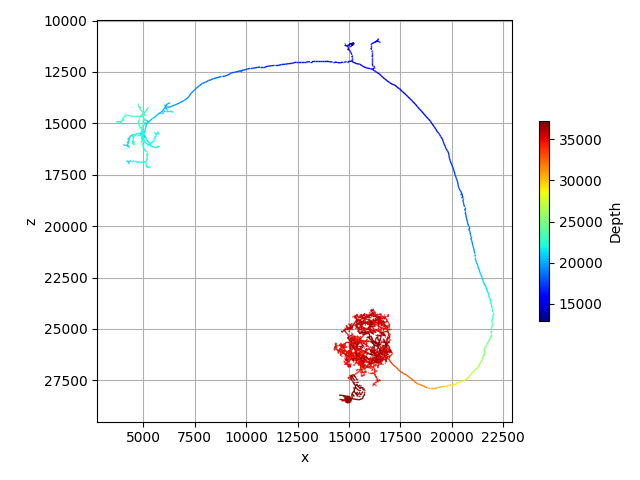
depth_coloring=True colors the neuron by distance from the camera. For this neuron, the ventral dendrites are closest to the camera while the dorsal axon is furthest away.
Pick your colormap
By default depth-coloring uses the jet colormap. Pass any of matplotlib's colormaps via the palette parameter.
navis.plot2d(n, depth_coloring=True, method="2d", view=("x", "-z"))
navis.plot2d(n, depth_coloring=True, palette="hsv", method="2d", view=("x", "-z"))
Total running time of the script: ( 0 minutes 0.279 seconds)
Download Python source code: tutorial_plotting_05_depth.py