Note
Click here to download the full example code
Brain Image Library#
Fetch neurons from the Brain Image Library (BIL).
The Brain Image Library (https://www.brainimagelibrary.org, BIL) is a public repository hosted at the Pittsburgh Supercomputing Center. It is primarily known for its (very large) microscopy data but it also hosts thousands of single neuron reconstructions - for example the fMOST-based mouse reconstructions produced by the BRAIN Initiative Cell Census Network (BICCN).
NAVis provides an interface that wraps BIL's metadata API and its download server:
Network access
This tutorial queries BIL's metadata API and download server over the network, so it needs an internet connection. No account or token is required.
import navis

# Import the Brain Image Library interface
import navis.interfaces.brain_image_library as bil
Searching for datasets#
Datasets are identified by a "bildid" - a little word triplet such as ace-boo-van. Use search to find them:
How search matches
| Rule | Behavior |
|---|---|
| Across different fields | combined with AND |
| Multiple values within one field | combined with OR |
| Value matching | exact - no substring or fuzzy matching |
See bil.FIELDS for all searchable fields, and use search(text=...) for a free-text search.
ds = bil.search(species="mouse", generalmodality="cell morphology", technique="fMOST", limit=5)
ds[["bildid", "title", "species", "technique", "number_of_files"]]
If you need a field that isn't in bil.FIELDS, drop down to the raw API via bil.query(division, element, value).
Inspecting a dataset#
Let's look at one dataset in more detail. get_metadata flattens BIL's rather deeply nested metadata into a single row per dataset:
meta = bil.get_metadata("ace-boo-van")
meta[["title", "species", "genotype", "dataset_size_gb", "number_of_files", "rights"]]
Datasets can be huge
BIL hosts datasets of hundreds of terabytes and millions of files. list_files and download_files therefore refuse to crawl or download very large datasets unless you explicitly override their guardrails. For bulk transfers you should use Globus instead.
It's good practice to look at a dataset's files before pulling anything. list_files crawls the dataset's directory listing and tells you exactly what is there (and how big it is):
files = bil.list_files("ace-boo-van", pattern="*.swc")
files[["name", "directory", "size"]].head()
Fetching neurons#
Now we can load the reconstructions. Passing the file table (rather than the dataset ID) means we fetch exactly the files we just looked at:
nl = bil.get_neurons(files, max_neurons=3)
nl
A word on units
BIL does not reliably record the units of its reconstructions. If you know them, pass e.g. units='um' straight through to navis.read_swc. The image.stepsizex field in the metadata (here "0.35 micron/pixel") tells you the voxel size if the coordinates happen to be in voxels.
If you want the files themselves rather than the neurons, use download_files:
# bil.download_files(files, "~/bil_data")
Check the license
Datasets carry their own licenses. Check the rights and dataset.rightsuri fields before you re-use any data.
Let's plot the neurons we fetched:
navis.plot2d(nl, view=("x", "-z"), method="2d", color_by="id", palette="tab10", lw=1.5)
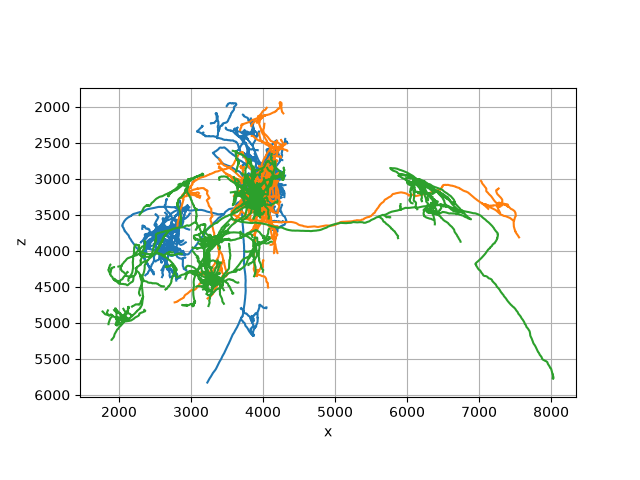
Out:
(<Figure size 640x480 with 1 Axes>, <Axes: xlabel='x', ylabel='z'>)
Check out the API reference for further details.
Total running time of the script: ( 0 minutes 3.142 seconds)
Download Python source code: tutorial_remote_05_bil.py