Note
Click here to download the full example code
Attaching Data#
Carry your own data through subsetting, masking and pruning.
New in NAVis 2.0
attach and attach_link are new and we are keen to hear how they hold up on real data. Please read Caveats and Antipatterns before relying on them for anything important.
A neuron is a bag of connected data#
A Skeleton looks like one table. It is really several kinds of thing, and a web of references between them:
graph LR
    N["nodes"]
    N -->|"parent_id"| N
    C["connectors"] -->|"node_id"| N
    T["tags"] -->|"lists of node IDs"| N
    S["soma"] -->|"one node ID"| N
    Y["your data"] -.->|"nothing declared"| N
Some of those references are obvious - a connector (synapse) is attached to a node on the skeleton, and says so in a column called node_id - other are less obvious. That's why removing a node is never just a single deletion. The node's children become roots; connectors sitting on it have nothing to sit on; tags mentioning it have to lose it; and if a soma on it is gone. Not propagating those changes would quietly degenerate the neuron into a broken mess.
You never had to think about any of this because NAVis does it for you! subset_neuron, masked, prune_twigs and everything built on them work from a single declaration each neuron class makes - what its elements are, and what points at what - so what you get back is a neuron you can keep working with, and you can stay on your analysis.
Your own data is not in that declaration. A per-vertex array you computed, a table of mitochondria you loaded, a per-connector score from a classifier: NAVis has never heard of them, so nothing carries them and nothing repairs them.
Most pipelines never need more than that - compute, read off a number, move on. This tutorial is for when yours does: when your data has to stay in step with the neuron through everything you do to it. Adding it to the declaration is all attach does.
Two kinds of data#
Before attaching anything, it is worth seeing that both kinds of data are already sitting in front of you. Here is a node table:
import numpy as np

import navis

n = navis.example_neurons(1, kind="skeleton")
n.nodes.head(3)
x, y, z and radius are aligned to the nodes: one value each, describing the node on its row and meaning nothing without it. parent_id is a different animal. Each of its values is a node - it names one.
The difference only shows when something is taken away. Cut the neuron in half:
sub = navis.subset_neuron(n, n.nodes.x.values < 16_000)

before = n.nodes.set_index("node_id")
after = sub.nodes.set_index("node_id")
kept = before.loc[after.index]

print(f"{n.n_nodes:,} -> {sub.n_nodes:,} nodes")
print(f"radius     unchanged: {np.array_equal(kept.radius.values, after.radius.values)}")
print(f"parent_id  rewritten: {(kept.parent_id.values != after.parent_id.values).sum()}")
Out:
4,465 -> 2,728 nodes
radius     unchanged: True
parent_id  rewritten: 25
Aligned data came through as a plain subset - every surviving node kept the radius it always had. The references could not: 25 nodes had their parent on the other side of the cut, and a parent_id naming a node that no longer exists is not a tree, so NAVis rewrote those to -1, making them roots.
It is the same two things all the way down, whichever neuron type you have:
Selecting nodes:
| Data | Kind | What a selection does |
|---|---|---|
nodes.x/y/z, radius, label, and any column you add | aligned to nodes | the survivors' values, unchanged |
nodes.parent_id | names a node | rewritten - -1 where the parent went, making a root |
connectors.node_id | names a node | the connector is dropped |
tags | names nodes | each list loses what went, and goes entirely if that empties it |
soma | names a node | cleared if that node went |
Selecting vertices:
| Data | Kind | What a selection does |
|---|---|---|
faces | names three vertices | the face is dropped if any corner went |
extra_edges | names two vertices | the same |
connectors.vertex_id | names a vertex | the connector is dropped |
the vertex map behind .skeleton | names a node, one per vertex | carried, and the skeleton is subset to the nodes that still have vertices |
soma_pos | neither - a coordinate | survives untouched, wherever it lands |
Note what is missing: a mesh has nothing of its own aligned to its vertices, because the vertices are the data. It is the type attach does the most for.
Selecting points:
| Data | Kind | What a selection does |
|---|---|---|
vect, alpha | aligned to points | the survivors' values, unchanged |
connectors.point | names a point | the connector is dropped |
soma | names a point | cleared if that point went |
Your data is one or the other too, and which one decides how you declare it:
-
Data aligned to elements
One value per node, vertex or connector. It goes where those elements go.
n.attach("depth", values, axis="vertices") -
Data that names elements
Values that are themselves elements - a node ID, a vertex index. Those have to be filtered and rewritten, which is what a link is for.
n.attach_link("mito", "mito_of_node", source="nodes", target_axis="mito")
graph LR
    A["one value<br>per element"] -->|"n.attach(name, data, axis=…)"| C["carried by every<br>selection"]
    B["rows of<br>its own"] -->|"n.attach(name, table, ids=…)"| D["an axis<br>of its own"]
    D -->|"n.attach_link(…)"| C
Quick start#
A neuron Mesh has no per-vertex table to add a column to - its vertices are an (N, 3) array and nothing else. So when you compute something per vertex there is nowhere to put it that a subset would know about. That is what attach is:
m = navis.example_neurons(1, kind="mesh")

# Stand-in for something you computed or loaded per vertex
depth = np.linalg.norm(m.vertices - m.vertices.mean(axis=0), axis=1)

# Nothing clever - one float per vertex, in vertex order
print("first 3 vertices:", m.vertices[:3].round().tolist())
print("their depths:    ", depth[:3].round(1).tolist())

m.attach("depth", depth, axis="vertices")

with navis.masked(m, m.vertices[:, 2] > np.percentile(m.vertices[:, 2], 40)):
    print(f"masked: {m.n_vertices:,} vertices, {len(m.depth):,} depths")

print(f"whole:  {m.n_vertices:,} vertices, {len(m.depth):,} depths")
Out:
first 3 vertices: [[15876.0, 16056.0, 12292.0], [15873.0, 16017.0, 12292.0], [13279.0, 16388.0, 11994.0]]
their depths:     [17804.0, 17834.9, 17709.4]
masked: 10,403 vertices, 10,403 depths
whole:  17,369 vertices, 17,369 depths
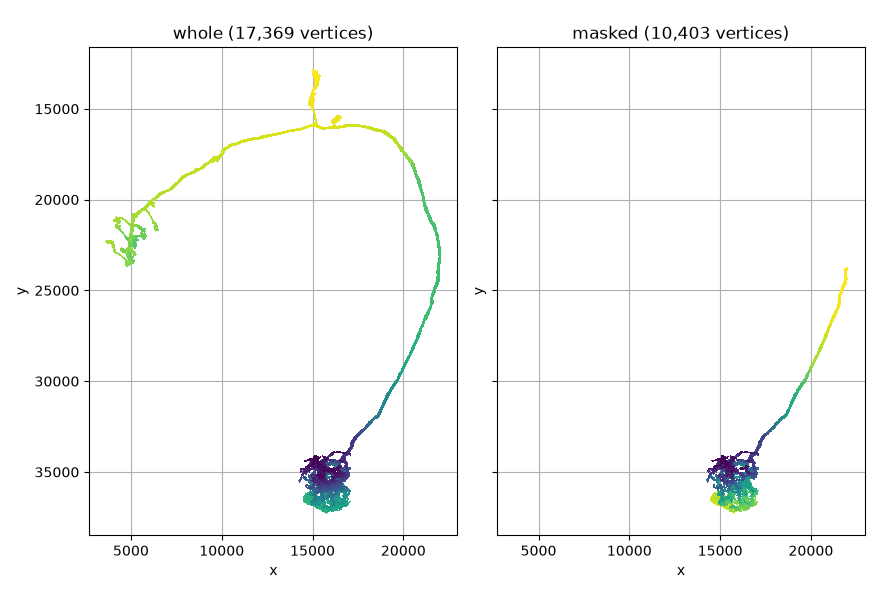
The values are still lined up with the vertices they describe, so anything that takes a per-vertex array keeps working inside the mask:
import matplotlib.pyplot as plt

fig, axes = plt.subplots(1, 2, figsize=(8.8, 6), sharex=True, sharey=True)

# Pin the colour scale so both panels mean the same thing
scale = dict(color_by="depth", palette="viridis", vmin=depth.min(), vmax=depth.max(),
             view=("x", "-y"), method="2d")

navis.plot2d(m, ax=axes[0], **scale)
axes[0].set_title(f"whole ({m.n_vertices:,} vertices)")

with navis.masked(m, m.vertices[:, 2] > np.percentile(m.vertices[:, 2], 40)):
    navis.plot2d(m, ax=axes[1], **scale)
    axes[1].set_title(f"masked ({m.n_vertices:,} vertices)")

plt.tight_layout()
Do you actually need it?#
For a Skeleton, often not. Its elements are a table, and the whole table is carried, so an extra column is already along for the ride:
n = navis.example_neurons(1, kind="skeleton")
n.nodes["score"] = np.arange(n.n_nodes)

print(navis.subset_neuron(n, n.nodes.node_id.values[:50]).nodes.score.values[:5])
Out:
[0 1 2 3 4]
Reach for attach when a column will not do:
| What you have | Where it goes |
|---|---|
one number per node of a Skeleton | a column in n.nodes - already carried |
| anything per vertex or per point | n.attach(..., axis="vertices"/"points") |
| anything per connector | n.attach(..., axis="connectors") |
| more than one number per element (a feature vector) | n.attach(...) - a column cannot hold it |
| rows of its own (mitochondria, annotations, ...) | n.attach(..., ids=...) + n.attach_link() |
The axes you can align to are the neuron's own kinds of element:
| Neuron type | Axes |
|---|---|
Skeleton | nodes, connectors |
Mesh | vertices, connectors |
Dotprops | points, connectors |
Aligned data#
Anything with one entry per element works - a 1d array, a 2d array of per-element vectors, or a DataFrame with one row per element:
n = navis.example_neurons(1, kind="skeleton")

n.attach("embedding", np.random.rand(n.n_nodes, 8), axis="nodes")
n.attach("conf", np.random.rand(n.n_connectors), axis="connectors")

sub = navis.subset_neuron(n, n.nodes.node_id.values[:200])
print(f"nodes      {n.n_nodes:>6,} -> {sub.n_nodes:>6,}   embedding {sub.embedding.shape}")
print(f"connectors {n.n_connectors:>6,} -> {sub.n_connectors:>6,}   conf      {sub.conf.shape}")
Out:
nodes       4,465 ->    200   embedding (200, 8)
connectors  2,705 ->      5   conf      (5,)
Note the connectors: nothing selected them, they went because the nodes they sit on did - and conf followed them, not the nodes. Attached data is carried by the axis it was aligned to, wherever that axis ends up.
The length is checked when you attach, which is the only moment NAVis can be sure what your data describes:
try:
    n.attach("wrong", np.arange(5), axis="nodes")
except ValueError as e:
    print(e)
Out:
"wrong" has 5 entries but axis "nodes" has 4465 elements.
Data with elements of its own#
Some data is not one-per-element: a table of mitochondria has as many rows as there are mitochondria. Give attach an ids column and the table becomes an axis - a kind of element this neuron has, alongside its nodes and connectors:
import pandas as pd

n = navis.example_neurons(1, kind="skeleton")

# 30 mitochondria, each with an ID of its own and a measurement
mito = pd.DataFrame({
    "mito_id": np.arange(30),
    "volume": (np.random.rand(30) * 1000).round(1),
})
n.attach("mito", mito, ids="mito_id")

mito.head(3)
On its own that does nothing for a subset - NAVis has no idea which mitochondria belong to which part of the neuron. Say so with a link.
Linking#
A link is one array wearing two hats: aligned to one axis, and naming elements of another. Which axis it is aligned to is decided by your data, not by preference - it is whichever side has exactly one value per element.
The array is one-per-node and its values name mitochondria.
n.attach("mito_of_node", mito_of_node, axis="nodes")
n.attach_link("mito", "mito_of_node", source="nodes", target_axis="mito")
The column is one-per-mitochondrion and its values name nodes.
n.attach_link("nodes", "mito", column="node_id",
              source="mito", target_axis="nodes")
We will take the first: one value per node, saying which mitochondrion it is inside - a mito_id, or -1 for the stretches that are in none. Here the first 300 nodes get ten each:
mito_of_node = np.full(n.n_nodes, -1)
mito_of_node[:300] = np.repeat(np.arange(30), 10)

pd.DataFrame({
    "node_id": n.nodes.node_id.values[:12],
    "mito_of_node": mito_of_node[:12],
}).T
That array is the link: aligned to the nodes (one value each), naming mitochondria (each value is a mito_id).
n.attach("mito_of_node", mito_of_node, axis="nodes")
n.attach_link(
    "mito",                 # what the far end is called
    "mito_of_node",         # where the values live
    source="nodes",         # ... aligned to the nodes
    target_axis="mito",     # ... and naming mitochondria
    cascade="propagate",    # keep only the mitochondria the survivors are in
    dangling="blank",       # a node whose mitochondrion is gone is still a node
)

sub = navis.subset_neuron(n, n.nodes.node_id.values[:120])
print(f"nodes {n.n_nodes:,} -> {sub.n_nodes}, mito {len(n.mito)} -> {len(sub.mito)}")
print("mitochondria kept:", sub.mito.mito_id.values)
Out:
nodes 4,465 -> 120, mito 30 -> 12
mitochondria kept: [ 0  1  2  3  4  5  6  7  8  9 10 11]
The two policies#
cascade decides what a selection of the source does to the far end:
cascade | A selection of the source axis… |
|---|---|
"propagate" | takes the far end with it - here, prunes unreferenced mitochondria |
"keep" | leaves the far end alone |
dangling decides what happens to a source element whose target is gone - either because the target was pruned, or because the value never named anything real:
dangling | A source element pointing at nothing… |
|---|---|
"blank" | stays, its value set to -1 |
"drop" | goes too |
"drop" is right when the source element only exists because of its target - a connector whose node was pruned is not a connector of anything. It is the wrong answer, and a destructive one, when the source axis is the neuron itself:
for policy in ("blank", "drop"):
    x = navis.example_neurons(1, kind="skeleton")
    bad = np.full(x.n_nodes, -1)
    bad[:300] = np.repeat(np.arange(30), 10)
    bad[100:150] = 999                              # no such mitochondrion
    x.attach("mito", mito.copy(), ids="mito_id")
    x.attach("mito_of_node", bad, axis="nodes")
    x.attach_link("mito", "mito_of_node", source="nodes", target_axis="mito",
                  dangling=policy)
    sub = navis.subset_neuron(x, x.nodes.node_id.values[:400])
    print(f'dangling="{policy}": {sub.n_nodes} of 400 nodes kept')
Out:
dangling="blank": 400 of 400 nodes kept
dangling="drop": 250 of 400 nodes kept
dangling="drop" drops source elements
Here the source axis is nodes, so "drop" deleted every node that had no mitochondrion to point at - including the ones that never claimed to have one. Whenever the source of a link is the neuron's own elements, you want "blank".
What NAVis links for you#
The neuron classes use exactly this machinery, which is why a masked mesh keeps its skeleton instead of re-deriving one:
m = navis.example_neurons(1, kind="mesh")
before = m.skeleton.nodes.node_id.values

with navis.masked(m, m.vertices[:, 2] > np.percentile(m.vertices[:, 2], 40)):
    print(f"{m.n_vertices:,} vertices -> skeleton of {m.skeleton.n_nodes:,} nodes")
    print("all of which the whole neuron also had:",
          np.isin(m.skeleton.nodes.node_id, before).all())
Out:
10,403 vertices -> skeleton of 1,249 nodes
all of which the whole neuron also had: True
| Link | On | Says |
|---|---|---|
vertices -> skeleton | Mesh | which node each vertex belongs to |
connectors -> vertices | Mesh | which vertex each connector sits on |
connectors -> nodes | Skeleton | which node each connector sits on |
connectors -> points | Dotprops | which point each connector sits on |
Asking across links#
A link is only there once its values are. The example mesh comes with connectors, but nothing has worked out which vertex each one sits on - so the connectors -> vertices link has nothing to read yet:
from navis.core import schema

m = navis.example_neurons(1, kind="mesh")

try:
    m.get_mapping("connectors", "vertices")
except schema.MappingError as e:
    print(e)
Out:
There is no "connectors->vertices" mapping: _connectors["vertex_id"] is not set, or does not have one value per "connectors" element. Links describe what is there - they do not generate it.
The link names the column it expects, so filling it in is all it takes:
cn = m.connectors.copy()
cn["vertex_id"] = m.snap(cn[["x", "y", "z"]].values)[0]
m.connectors = cn

print(m.get_mapping("connectors", "vertices")[:5])
Out:
[1359 1380 2365 2011 2773]
Links compose, so a correspondence nobody declared directly is still available. Nothing says which node a connector sits on - but the vertices do, and the mesh's skeleton knows the rest of the way:
m.skeleton  # generate it, so there is a vertex map to read

print([link.key for link in schema.link_path(m, "connectors", "skeleton")])
print("first five connectors sit on nodes",
      m.get_mapping("connectors", "skeleton")[:5])
Out:
['connectors->vertices', 'vertices->skeleton']
first five connectors sit on nodes [340 340 116 195 120]
Links are directed, and only ever followed forwards - a vertex has one node, but a node has many vertices, so the reverse is not a mapping at all. Asked as a selection it is perfectly well defined, and that is what select_across is for:
some_nodes = m.skeleton.nodes.node_id.values[:50]
vertices = m.select_across("vertices", "skeleton", some_nodes)

print(f"{vertices.sum():,} of {m.n_vertices:,} vertices belong to those 50 nodes")
Out:
311 of 17,369 vertices belong to those 50 nodes
Seeing what you attached#
Attached data is a plain attribute, so nothing in a neuron's summary mentions it. attached is how you ask:
n = navis.example_neurons(1, kind="skeleton")
n.attach("embedding", np.random.rand(n.n_nodes, 8), axis="nodes")
n.attach("mito", mito, ids="mito_id")
n.attach("mito_of_node", mito_of_node, axis="nodes")
n.attach_link("mito", "mito_of_node", source="nodes", target_axis="mito",
              dangling="blank")

n.attached()
A shape of None on a link is the case from the last section - the link is declared, but the values it reads are not there yet.
Over a NeuronList the same call summarises, because attached data is per neuron and a list is free to be ragged:
nl = navis.example_neurons(3, kind="skeleton")
for x in nl[:2]:
    x.attach("score", np.arange(x.n_nodes), axis="nodes")

nl.attached()
Caveats#
navis.core.schema is not a settled interface
attach, attach_link, attached, get_mapping and select_across are methods on the neuron and are the supported way in. The module behind them is public enough to read and to call the rest of (link_path, MappingError), but its surface may still move between 2.x releases.
Selections carry your data. Rebuilds drop it unless you say otherwise.
The rule is about elements, not about functions. A selection hands you back something made of the elements you had, so everything follows by construction. A rebuild replaces them - and even where it keeps most of them, it is free to mint IDs however it likes, so a node that comes back wearing a familiar ID is not thereby the same point. Attached data is therefore dropped, with a warning, rather than left at the old length for you to trip over.
| Carried | Dropped, loudly |
|---|---|
subset_neuron, mask | resample_skeleton |
prune_twigs, prune_by_strahler | stitch_skeletons, combine_neurons |
smooth_skeleton, transforms, copy() | downsample_neuron - unless you ask |
unmasking with reset=False | simplify_mesh - unless you ask |
Some rebuilds can say which of their elements are old ones. downsample_neuron is the case: it only thins slabs, so every node it keeps really is the node it was. simplify_mesh is the other, and says something weaker: no new vertex is an old one, but it knows which old vertices were merged into each, and the value of the first of them is what the new one takes. on_rebuild="carry" takes both up on that, and still drops if a rebuild turns out to be unable to say:
>>> n.attach("score", np.arange(n.n_nodes), axis="nodes", on_rebuild="carry")
>>> navis.downsample_neuron(n, 10).score.shape     # 1304 nodes, 1304 values
(1304,)
>>> navis.resample_skeleton(n, 1000).score         # re-samples, so: no claim
AttributeError: Skeleton has no attribute "score"
Things that name elements follow the rebuild instead
A value that names a node does not need a value invented for it, only somewhere to point - and a rebuild that re-samples the arbour can say where. That is why connectors, tags and the soma come through resample_skeleton sitting on the nearest node of the same branch. attach_link(..., on_rebuild="snap") asks for the same treatment; the default is to treat the old element as gone, exactly as a selection would.
Note this is a different question from dangling, which is about a target that is gone. Under a rebuild it may merely have moved.
It works on positional axes too, where there is no ID to go by: simplify_mesh merges vertices rather than keeping them, and tracks which went where, so a connector's vertex_id follows the vertex it named to whatever it was merged into. Only a vertex the decimation left with no surviving face at all has no answer, and there a connector falls back to the nearest surviving vertex - it still names a place on the surface.
Assigning to an axis is not the same as selecting it
Selecting says which elements survived; assigning does not. Replacing a neuron's .nodes, .vertices, .points or .connectors therefore drops anything aligned to the old ones - with a warning, because nothing can say where they went. The one exception is an id-bearing axis whose new elements are all old ones: that is a selection written as an assignment, and the IDs say exactly which survived.
Attached data is not saved
No format writes it - not write_swc, not write_parquet. pickle does, because it takes the whole object. Everything else round-trips back without it, silently.
Links describe what is there; they do not build it
mesh.get_mapping("connectors", "skeleton") reads the vertex map on the mesh's stored skeleton. If nothing has generated that skeleton yet there is no mapping to read, and you get a MappingError saying so - touch mesh.skeleton first. Likewise, a mesh's connectors only take part in a link if the table actually has the vertex_id column the link names.
A mapping goes stale when its elements change
A mapping is only true of the elements it was built against. Move a mesh's vertices - by assigning them, or by transforming the neuron - and the vertex map no longer describes them, so get_mapping raises rather than answering something wrong.
Touching mesh.skeleton clears that by rebuilding it, which gives you a working mapping onto a skeleton with different node IDs. Selecting is the path that keeps identity; nothing else can say which node is which.
One name per neuron, and not one that is taken
attach refuses names the class already defines - label, soma, volume - rather than shadowing them. Attached data is per neuron, so over a NeuronList you attach in a loop; nl.attached_name then collects the values the way any other neuron attribute does.
Antipatterns#
1. Just setting an attribute#
The neuron will happily hold it. Nothing will ever update it, and after a subset it describes elements that are no longer there - at the same length as before, so it still indexes cleanly.
n.depth = depth                      # a plain attribute
sub = navis.subset_neuron(n, mask)
sub.depth                            # ← still the whole neuron's values
n.attach("depth", depth, axis="nodes")
sub = navis.subset_neuron(n, mask)
sub.depth                            # ← the survivors' values
2. attach for something that names elements#
This one survives every check and still ends up wrong. attach carries values; it has no idea they mean anything. An array of node IDs is duly subset to the connectors that survived - and goes on naming nodes that did not.
n.attach("nearest_node", node_ids, axis="connectors")
sub = navis.subset_neuron(n, mask)
sub.nearest_node                     # ← right length, dead node IDs
n.attach("nearest_node", node_ids, axis="connectors")
n.attach_link("nearest", "nearest_node", source="connectors",
              target_axis="nodes", cascade="keep", dangling="blank")
sub.nearest_node                     # ← `-1` where the node is gone
Note the name: "nearest", not "nodes". A link is identified by source->name, and a Skeleton already has a connectors->nodes - reusing the name replaces the declaration that keeps the connector table honest, and its connectors stop being pruned at all. NAVis warns when you point a replacement at different values, since that is rarely what anyone means. (Replacing one on purpose is how you would change a built-in link's dangling policy; point it at the same mapping and it goes through quietly.)
The mirror of this - declaring a link over per-element measurements - fails louder: NAVis tries to repair the floats as if they were IDs.
3. Pointing the link the wrong way#
The direction is decided by which side has one value per element, not by which question you want to ask. Both questions are answerable either way - forwards with get_mapping, backwards with select_across.
# one row per mitochondrion, so it cannot be aligned to the nodes
n.attach_link("mito", "mito", column="node_id",
              source="nodes", target_axis="mito")
n.attach_link("nodes", "mito", column="node_id",
              source="mito", target_axis="nodes")
# "which nodes are in mitochondrion 0?"
n.select_across("mito", "nodes", [0])
4. Writing a mapping by hand#
The bookkeeping that decides whether a mapping can still be trusted is updated when the mapping is set through the schema. Assign to the private array and it is not - so a stale map reads as current, and the next selection carries the wrong data across instead of refusing.
mesh.skeleton._vertex_map = my_map
sk.vertex_map = my_map               # validated
mesh.skeleton = sk                   # ... and stamped against this mesh
5. Attaching what you could compute#
Attached data is carried, never recomputed. Anything derived from the elements is a copy that quietly stops being true - and for most such things NAVis already has a function that is right by construction.
n.attach("dist_to_root", navis.dist_to_root(n), axis="nodes")
navis.prune_twigs(n, 5000, inplace=True)
n.dist_to_root                       # ← distances of a neuron that no longer exists
navis.dist_to_root(n) # ask when you need it
6. Attaching to a mesh's skeleton#
It works, and it even survives a mask - the link carries node identity, so the skeleton that comes out of a selection is the same skeleton. But a mesh's skeleton is derived, and anything NAVis cannot follow rebuilds it from scratch, taking whatever you hung off it along. Attach to the elements the mesh owns instead, and map across the link when you need nodes.
m.skeleton.attach("branch_label", labels, axis="nodes")
m /= 1000                            # regenerates the skeleton
m.skeleton.branch_label              # AttributeError
# `labels` a Series indexed by node ID; spread it onto the vertices that own them
per_vertex = labels.loc[m.get_mapping("vertices", "skeleton")].values
m.attach("branch_label", per_vertex, axis="vertices")
Summary#
| If you want to… | Use |
|---|---|
| carry one value per node of a skeleton | a column in n.nodes |
| carry one value per vertex, point or connector | .attach(name, data, axis=...) |
| carry a table with rows of its own | .attach(name, table, ids=...) |
| say which elements that table belongs to | .attach_link(...) |
| take it all off again | .detach(name) |
| ask what corresponds to what | .get_mapping(source, target) |
| select on one axis by a selection on another | .select_across(source, target, sel) |
| see what you have attached | .attached() |
Total running time of the script: ( 0 minutes 1.071 seconds)
Download Python source code: tutorial_basic_04_attach.py