Note
Click here to download the full example code
R & the natverse#
Exchange neurons with R's natverse by reading and writing .rds/.rda files.
The natverse is NAVis' counterpart in R: nat for neurons, nat.nblast for NBLAST, rcatmaid for CATMAID and so on. Moving data between the two is a matter of writing an R data file on one side and reading it on the other - no R installation, no rpy2 and no running R session required. The serialisation is handled by rdata.
| navis | natverse |
|---|---|
Skeleton | nat::neuron |
Dotprops | nat::dotprops |
Mesh / Volume | rgl::mesh3d |
Voxels | nat::im3d |
NeuronList | nat::neuronlist |
Python R#
Two functions, mirroring R's own saveRDS() and save():
navis.write_rdswrites a single, unnamed objectnavis.write_rdawrites named objects, like an R workspace
Writing requires Python 3.11 or later
rdata gained the ability to write R data files in version 1.0, which requires Python >= 3.11. On Python 3.10 NAVis installs the last rdata that runs there: reading .rds/.rda works as documented below, but write_rds/write_rda will raise an ImportError.
Let's start with a NeuronList:
import navis
import shutil
import tempfile

import matplotlib.pyplot as plt

from pathlib import Path

# Somewhere to put the files for this tutorial
tmp = Path(tempfile.mkdtemp())

nl = navis.example_neurons(3)

navis.write_rds(nl, tmp / "neurons.rds")
That's it. Over in R:
library(nat)

nl <- readRDS('neurons.rds')
summary(nl)
           root nodes segments branchpoints endpoints cable.length
1734350788    1  4465     1217          599       619     266476.9
1734350908    1  4847     1496          735       762     304332.7
722817260     1  4332     1289          633       657     274703.4
These are genuine nat neurons, not look-alikes: NAVis computes nat's SegList topology (the runs of nodes between branch points, which is what nat actually navigates by), so the rest of the toolbox works on them:
summary(resample(nl[[1]], 1000))
  root nodes segments branchpoints endpoints cable.length
1    1  3957     1217          599       619     263985.2
Writing several objects at once#
navis.write_rda takes a dictionary; the keys become the R object names that load() drops into the session:
navis.write_rda(
    {
        "neurons": nl,
        "dps": navis.make_dotprops(nl, k=5),
        "LH": navis.example_volume("LH"),
    },
    tmp / "data.rda",
)
load('data.rda')          # brings `neurons`, `dps` and `LH` into the session

plot3d(neurons, col='navy')
plot3d(LH, alpha=0.2)
R Python#
The same two formats read back with navis.read_rds and navis.read_rda. This works on files R wrote just as well as on our own - including the datasets that ship with nat itself:
nl2 = navis.read_rds(tmp / "neurons.rds")
nl2
Meta data survives the trip. A neuronlist's attached data.frame becomes neuron attributes, and nat's NeuronName maps onto .name:
nl2[0].name, nl2[0].id
Out:
('DA1_lPN_R', np.int32(1734350788))
And the neurons themselves come back intact:
fig, ax = navis.plot2d(nl2, view=("x", "-z"), lw=1.5, method="2d")
plt.tight_layout()
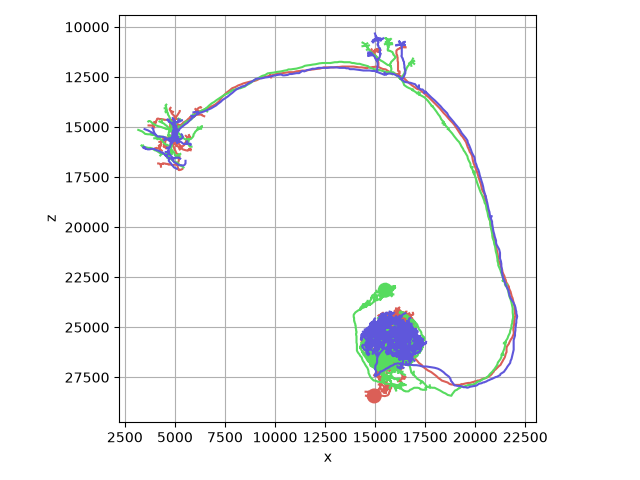
By default you only get the neurons. Pass neurons_only=False to see everything the file contains, keyed by its R name:
data = navis.read_rda(tmp / "data.rda", neurons_only=False, combine=False)
{k: type(v).__name__ for k, v in data.items()}
Out:
{'neurons': 'NeuronList', 'dps': 'NeuronList', 'LH': 'Volume'}
Things worth knowing#
Units
R has no concept of units. NAVis neurons do, and nothing converts them for you - so if the R side expects microns (as most natverse template brains do) while your neurons are in nanometres, convert before writing:
navis.write_rds(nl.convert_units("um"), "neurons.rds")
Radii vs diameters
nat's W column is a diameter, NAVis stores radii. We double on the way out and halve on the way back in, so a round trip is lossless - it only matters if you compare the two representations directly.
A few smaller details:
- Names: a
neuronlistis a named R list, so neuron IDs become strings. Duplicate IDs get a.1,.2, ... suffix, since R list names double as thedata.framerow names. - Connectors are written with the column names the R
catmaidpackage expects (treenode_id,prepost) and renamed back on the way in. - Compression: both writers default to
compresslevel=6, matching R'ssaveRDS. Drop to1for speed or raise to9for the last few percent of file size. - Memory:
rdatahas no streaming API, so the whole dataset is assembled in memory before anything hits disk. Budget roughly 2x the uncompressed file size on top of the neurons themselves, and write very large collections in batches.
What happened to navis.interfaces.r?
NAVis used to ship an rpy2-based interface that called natverse functions from Python. It has been retired: it needed a working R installation plus rpy2, and everything it did now has a native home.
| Retired | Use instead |
|---|---|
r.neuron2r() / r.neuron2py() | navis.write_rds / navis.read_rds |
r.load_rda() | navis.read_rda |
r.nblast() / r.nblast_allbyall() | navis.nblast / navis.nblast_allbyall |
r.xform_brain() / r.mirror_brain() | navis.xform_brain / navis.mirror_brain |
r.get_neuropil() / r.get_brain_template_mesh() | flybrains |
The transform functions need flybrains for the Drosophila template brains - see the transforms tutorial.
See the skeleton, mesh and dotprops tutorials for the other formats NAVis reads and writes.
# Clean up
shutil.rmtree(tmp)
Total running time of the script: ( 0 minutes 2.393 seconds)
Download Python source code: tutorial_io_03_r.py