Note
Click here to download the full example code
Masking#
Restrict analyses, plots and edits to part of a neuron - reversibly.
New in NAVis 2.0
Masking is new and we are keen to hear how it holds up on real data. Please read Caveats and Antipatterns before relying on it for anything important.
You have always been able to carve a piece out of a neuron with navis.subset_neuron. That is a one-way street: you get a new neuron and the relationship to the one it came from is gone. Masking keeps that relationship, which buys you two things.
-
Look at a part
A masked neuron is the masked region. Every function, property and plot sees only that part - no special-casing anywhere. (With one sharp edge, if your mask cuts across branches: see Caveats.)
-
Edit a part
Prune, downsample or smooth just the axon, then put the neuron back together with the edit folded in.
graph LR
    A[whole neuron] -->|"mask(axon)"| B[axon only]
    B -->|analyse / plot| B
    B -->|"unmask()"| A
    B -->|"unmask(reset=False)"| C[whole neuron<br>with edits]
Quick start#
The navis.masked context manager is the way to use masks. It masks on the way in and unmasks on the way out - including if something raises inside the block, in which case the neuron is restored rather than left half-edited.
import navis

n = navis.example_neurons(kind="skeleton", n=1)

# Label axon and dendrites so we have something to mask by
navis.split_axon_dendrite(n, label_only=True)

with navis.masked(n, lambda x: x.nodes.compartment == "axon"):
    axon_cable = n.cable_length * n.units

print("Axon:  ", axon_cable)
print("Whole: ", n.cable_length * n.units)
Out:
Axon:   363469.75 nanometer
Whole:  2131815.0 nanometer
Note that n is the same object throughout - it was the axon inside the block and is the whole neuron again outside it. Nothing had to be reassigned, so code holding a reference to n sees the masked version too.
What can be a mask#
Masks are inclusive: elements where the mask is True are kept.
| Neuron type | A boolean mask must be one per… |
|---|---|
Skeleton | node |
Mesh | vertex or face |
Dotprops | point |
Anything navis.subset_neuron accepts works, so you rarely need to build the boolean array yourself:
Evaluated per neuron - the only option that works unchanged across a whole NeuronList.
navis.masked(n, lambda x: x.nodes.compartment == "axon")
A numpy array or pandas.Series, one value per element.
navis.masked(n, n.nodes.y > 35_000)
Node IDs for skeletons; vertex indices for meshes; point indices for dotprops.
navis.masked(n, n.nodes.node_id.values[:2000])
One entry per neuron, keyed by ID - for when each neuron in a list needs its own.
navis.masked(nl, {n.id: some_mask for n in nl})
Reading through a mask#
Because a masked neuron is just a neuron, every navis function works on it. Here we measure each compartment without writing any compartment-aware code:
comp = n.nodes.compartment

for label in ("axon", "dendrite"):
    with navis.masked(n, comp == label):
        print(f"{label:9} {n.cable_length * n.units}  ({n.n_branches} branch points)")
Out:
axon      363469.75 nanometer  (59 branch points)
dendrite  1410770.0 nanometer  (515 branch points)
The same goes for plotting:
import matplotlib.pyplot as plt

with navis.masked(n, comp == "axon"):
    fig, ax = navis.plot2d(n, view=("x", "-y"), color="red", radius=True, method="2d")
plt.tight_layout()
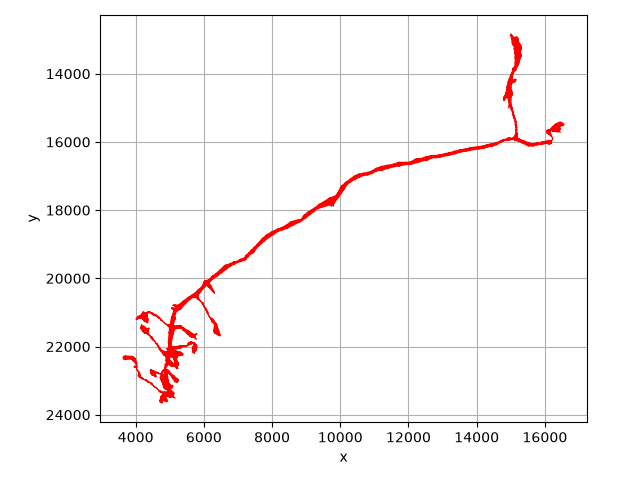
Plotting compartments is not what masks are for
For a picture like the one above, plot2d's color_by argument is simpler - see coloring neurons. Reach for a mask when you want analyses restricted, not just colors.
Many neurons at once#
Pass a NeuronList and a callable, and each neuron gets its own mask:
nl = navis.example_neurons(3, kind="skeleton")
navis.split_axon_dendrite(nl, label_only=True)

with navis.masked(nl, lambda x: x.nodes.compartment == "axon"):
    print("Axon cable:    ", nl.cable_length.round(1))

print("Whole neurons: ", nl.cable_length.round(1))
Out:
Axon cable:     [45433.7 51393.4 48779. ]
Whole neurons:  [266476.9 304332.6 274703.4]
Editing through a mask#
This is where masking earns its keep. Pass reset=False and edits made inside the block are folded back into the whole neuron when it closes.
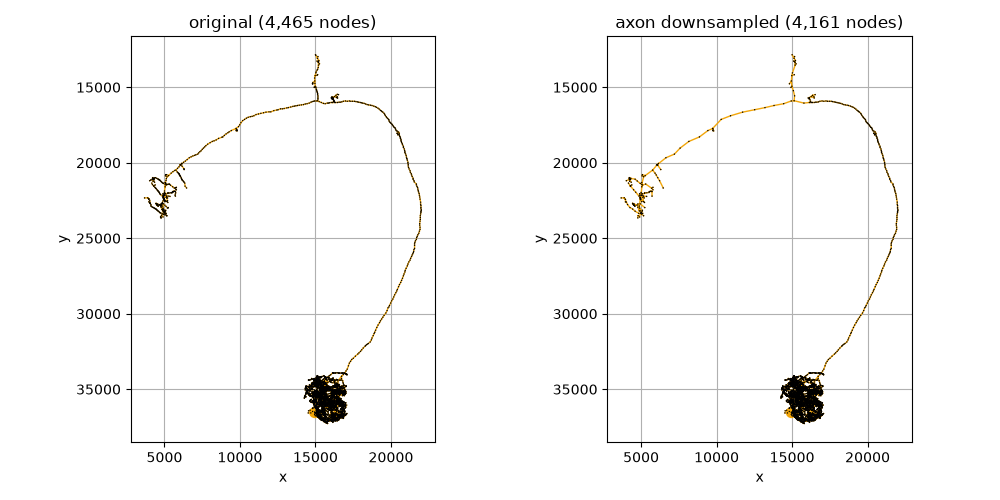
Say we want to downsample the axon but leave the dendrites at full resolution:
n2 = navis.example_neurons(kind="skeleton", n=1)
navis.split_axon_dendrite(n2, label_only=True)
original = n2.copy()

with navis.masked(n2, lambda x: x.nodes.compartment == "axon", reset=False):
    navis.downsample_neuron(n2, 5, inplace=True)

print(f"Before: {original.n_nodes:,} nodes")
print(f"After:  {n2.n_nodes:,} nodes")
Out:
Before: 4,465 nodes
After:  4,161 nodes
The neuron is whole again - still one connected tree, with the dendrites untouched:
fig, axes = plt.subplots(1, 2, figsize=(10, 5))
navis.plot2d(
    [original, original.nodes[["x", "y", "z"]].values],
    ax=axes[0], view=("x", "-y"), method="2d",
)
navis.plot2d(
    [n2, n2.nodes[["x", "y", "z"]].values],
    ax=axes[1], view=("x", "-y"), method="2d",
)
axes[0].set_title(f"original ({original.n_nodes:,} nodes)")
axes[1].set_title(f"axon downsampled ({n2.n_nodes:,} nodes)")
plt.tight_layout()
Deletions propagate too. Pruning twigs inside the mask removes them from the whole neuron - the nodes the mask covered are replaced by whatever the mask left behind:
n3 = navis.example_neurons(kind="skeleton", n=1)
navis.split_axon_dendrite(n3, label_only=True)

before = n3.n_nodes
with navis.masked(n3, lambda x: x.nodes.compartment == "axon", reset=False):
    navis.prune_twigs(n3, 5000, inplace=True)

print(f"{before:,} -> {n3.n_nodes:,} nodes, still {len(n3.root)} root")
Out:
4,465 -> 4,313 nodes, still 1 root
reset=False is all-or-nothing
The edit is folded back only if the block runs to completion. If anything raises inside it, the block resets instead - you get the neuron you started with, and the exception. There is no state in which a half-finished edit has landed.
with navis.masked(n, axon, reset=False):
    navis.prune_twigs(n, 5000, inplace=True)
    raise RuntimeError("...")     # n is unchanged, the pruning is discarded
Over a NeuronList each neuron is unmasked independently, so one that cannot be merged back does not strand the rest: it is restored, the others keep their edits, and you get a MaskingError naming the one that failed.
Nesting#
Masks stack. An inner mask does not need to know an outer one exists, and each unmask peels off exactly one layer:
n4 = navis.example_neurons(kind="skeleton", n=1)
navis.split_axon_dendrite(n4, label_only=True)

with navis.masked(n4, lambda x: x.nodes.compartment == "axon"):
    print(f"axon:            {n4.n_nodes:,} nodes")
    with navis.masked(n4, lambda x: x.nodes.type == "end"):
        print(f"axon end nodes:  {n4.n_nodes:,} nodes")
    print(f"back to axon:    {n4.n_nodes:,} nodes")
print(f"whole neuron:    {n4.n_nodes:,} nodes")
Out:
axon:            474 nodes
axon end nodes:  61 nodes
back to axon:    474 nodes
whole neuron:    4,465 nodes
Without a block#
Sometimes a mask has to outlive a with block - it is opened in one function and closed in another. The methods underneath are available directly:
| Method | Does |
|---|---|
.mask() | apply a mask (push a layer) |
.unmask() | remove the innermost mask (pop a layer) |
.apply_mask() | make the mask permanent - no going back |
.is_masked | is there a mask on this neuron right now? |
n5 = navis.example_neurons(kind="skeleton", n=1)
navis.split_axon_dendrite(n5, label_only=True)

n5.mask(n5.nodes.compartment == "axon", inplace=True)
print(f"masked:   {n5.n_nodes:,} nodes, is_masked={n5.is_masked}")

n5.unmask()
print(f"unmasked: {n5.n_nodes:,} nodes, is_masked={n5.is_masked}")
Out:
masked:   474 nodes, is_masked=True
unmasked: 4,465 nodes, is_masked=False
Prefer the context manager
.mask() and .unmask() are easy to leave unbalanced - one early return or one exception and a neuron stays masked, silently, for the rest of your session. navis.masked cannot get this wrong.
The primitives underneath#
Masking is a thin layer over two public functions, and you can use them directly if you would rather pass the piece around as a separate object:
n6 = navis.example_neurons(kind="skeleton", n=1)
navis.split_axon_dendrite(n6, label_only=True)

# `track=True` records where each node came from
axon = navis.subset_neuron(n6, n6.nodes.compartment == "axon", track=True)
axon = navis.prune_twigs(axon, 5000)

# ... and that record is what lets the edit be folded back in
merged = navis.merge_subset(n6, axon)

print(f"{n6.n_nodes:,} -> {merged.n_nodes:,} nodes")
Out:
4,465 -> 4,313 nodes
Caveats#
Masking copies data
A mask is not a view. Masking allocates a new node table (or vertex array), and the pre-mask state is kept alongside so it can be restored. Masking a large neuron in a tight loop will cost you; masking it once around a block of work will not.
Element order is not preserved by reset=False
Identity is: a node keeps its node_id, and connectors, tags and the soma follow their elements. But merging puts the untouched part first and the formerly-masked part after it, so positional indexing is not stable across the block.
n.nodes.iloc[0]              # ❌ may be a different node afterwards
n.nodes.node_id == 12345     # ✅ stable
Only element edits are carried back
A mask covers one kind of thing: a skeleton's nodes, a mesh's vertices, a dotprops' points. Those are what merging brings back. Everything else in the neuron points at them, and merging rebuilds it from the unmasked neuron, re-pointed at whichever elements survived - it does not look at the masked copy's version at all.
So edits that change elements (pruning, downsampling, moving nodes) carry back, and the tables that hang off them follow along. An edit to one of those tables that does not touch a single element is silently dropped:
| Edited inside the mask | On reset=False |
|---|---|
| nodes / vertices / points | ✅ carried back |
| connectors, tags, soma — via the elements they sit on | ✅ follow their element |
| connectors, tags, soma — on their own | ❌ dropped |
| mesh faces on their own | ❌ dropped |
Mesh faces are the one that surprises people, because they look like data rather than a reference. They are a reference: three vertex indices each. Deleting faces inside a mask without deleting their vertices leaves nothing for the merge to notice, and the original faces come back. Drop the vertices instead - with navis.subset_neuron - and the faces that used them go with them.
Your own data can ride along too
"The tables that hang off the elements" is not a fixed list - it is a declaration, and .attach() lets you add to it. Per-vertex labels, per-connector scores or a table of your own are then masked, subset and merged back exactly like the neuron's own. See attaching data.
A mask that cuts across branches invents endings
This is the sharpest edge in masking, and worth understanding before you use reset=False.
A masked skeleton is a real skeleton. A node whose children fell outside the mask has no children now, so it is indistinguishable from a genuine tip — to navis, and to you. Anything that works from the tips therefore measures from the cut:
prune_twigserodes the boundary, and keeps eroding inwards forsizestrahler_indexandprune_by_strahlerorder branches off the wrong terminals.leafs,.n_leafsand.segmentscount the cut points as endings
With reset=False the damage lands on the whole neuron: the eroded boundary is deleted, severing everything distal to it.
>>> mask = navis.graph.geodesic_matrix(n, from_=[n.root[0]]).values[0] < 12_000
>>> with navis.masked(n, mask, reset=False):
...     navis.prune_twigs(n, 10_000, inplace=True)
>>> len(n.root)
45                     # ← was 1; the neuron is now 45 disconnected pieces
navis warns you twice about this, and both checks are precise — they stay quiet for masks that keep whole subtrees:
- on the way in, if the mask cuts across branches at all. A heads-up: your leaf counts are already wrong, whatever you go on to do.
| Mask | Warns |
|---|---|
compartment == "axon" | no — a compartment ends where the neuron does |
in_volume(...) over a tuft | no |
y > 35_000, a geodesic radius | yes |
- on the way out, with
reset=Falseonly, if folding the mask back left the neuron in more pieces than it was. That one fires on damage rather than on risk, so it is the one to take seriously.
Pass warn_cut=False to either once you know.
The fix: mask=, not a mask
Where a function takes its own mask argument, use that instead. It runs on the intact neuron — so every tip it sees is a real tip — and restricts only where the edit applies. Same intent, right answer:
with navis.masked(n, mask, reset=False):
    navis.prune_twigs(n, 10_000, inplace=True)
# 2,340 nodes, 45 roots
navis.prune_twigs(n, 10_000, mask=mask, inplace=True)
# 2,530 nodes, 1 root
prune_twigs, heal_skeleton and heal_mesh take one today. Where a function does not, there is no way around doing the work on the whole neuron and subsetting afterwards.
Masking is still the right tool for everything else — measuring, plotting, and edits that do not work from the tips (downsampling, smoothing, transforms).
Meshes and dotprops are stricter than skeletons
Skeleton nodes carry IDs, so navis can always tell which node is which. Mesh vertices and dotprops points are identified by position, so if something restructures them in a way navis cannot follow, unmasking with reset=False raises MergeError rather than guessing. reset=True always works.
A masked mesh loses its skeleton
Mesh.skeleton is regenerated rather than kept in sync, so it is recomputed after masking. Cheap for one neuron, less so in bulk.
Voxels cannot be masked
Voxels have no element axis declared, so masking them raises. Convert to another representation first.
Antipatterns#
Each of these does something, just not what it looks like.
1. Expecting edits to survive the default#
reset=True is the default, and it throws your work away on purpose - that is what makes read-only masking safe. It fails silently, because discarding edits is exactly what you asked for.
with navis.masked(n, axon):
    navis.prune_twigs(n, 5000, inplace=True)
# n is unchanged - the pruning is gone
with navis.masked(n, axon, reset=False):
    navis.prune_twigs(n, 5000, inplace=True)
2. Holding a reference across the boundary#
Masking replaces the neuron's data. A .nodes table you grabbed beforehand is still the old table - it does not track the mask, and writing to it does not reach the neuron.
nodes = n.nodes                  # the whole neuron's table
with navis.masked(n, axon):
    nodes["flag"] = True         # writes to a table nothing is using
with navis.masked(n, axon):
    n.nodes["flag"] = True       # re-read inside the block
3. Masking in a loop#
Each mask copies. If the mask is the same every time, hoist it - or just use navis.subset_neuron, which is what you actually want for a one-way workflow.
for threshold in thresholds:
    with navis.masked(n, n.nodes.compartment == "axon"):
        results.append(navis.prune_twigs(n, threshold).cable_length)
axon = navis.subset_neuron(n, n.nodes.compartment == "axon")
results = [navis.prune_twigs(axon, t).cable_length for t in thresholds]
4. Building the mask from a stale table#
A mask has to match the neuron as it is now. Inside another mask, or after an edit, an array built earlier is the wrong length - and if it happens to be the right length, it is silently the wrong mask.
mask = n.nodes.y > 35_000        # one value per node of the WHOLE neuron
with navis.masked(n, axon):
    with navis.masked(n, mask):  # wrong length - the axon has fewer nodes
        ...
with navis.masked(n, axon):
    with navis.masked(n, lambda x: x.nodes.y > 35_000):   # evaluated in context
        ...
5. Unbalanced .mask() / .unmask()#
Masks nest, which means they also leak. A function that masks and returns early leaves its caller holding a neuron that is quietly a fragment of itself.
def measure(n):
    n.mask(n.nodes.compartment == "axon", inplace=True)
    if not n.n_nodes:
        return 0                 # never unmasked
    result = n.cable_length
    n.unmask()
    return result
def measure(n):
    with navis.masked(n, n.nodes.compartment == "axon"):
        return n.cable_length if n.n_nodes else 0
6. Reaching past the neuron's own API#
Assigning to private arrays skips the bookkeeping that makes merging possible. For meshes and dotprops this is caught (MergeError); nothing can catch it in general.
with navis.masked(m, verts, reset=False):
    m._vertices = m._vertices[:100]      # nothing knows these moved
with navis.masked(m, verts, reset=False):
    navis.subset_neuron(m, np.arange(100), inplace=True)
Summary#
| If you want to… | Use |
|---|---|
| measure or plot part of a neuron | with navis.masked(n, mask): |
| edit part of a neuron, keep the rest | with navis.masked(n, mask, reset=False): |
| carve a piece off and never look back | navis.subset_neuron |
| pass the piece around, merge later | subset_neuron(..., track=True) + navis.merge_subset |
| keep the masked region as the neuron | .apply_mask() |
Total running time of the script: ( 0 minutes 1.138 seconds)
Download Python source code: tutorial_basic_03_masking.py